The sevadar's map ยท sikhi.io

Learn the AI Age

written for sevadars who do not write code, by Claude

Progress: 0/66

๐ŸŒŸ Part

AI Foundations

Meet the new tools and what each one is for.

๐Ÿชž

Why this guide exists

The map nobody has put together before, in plain English.
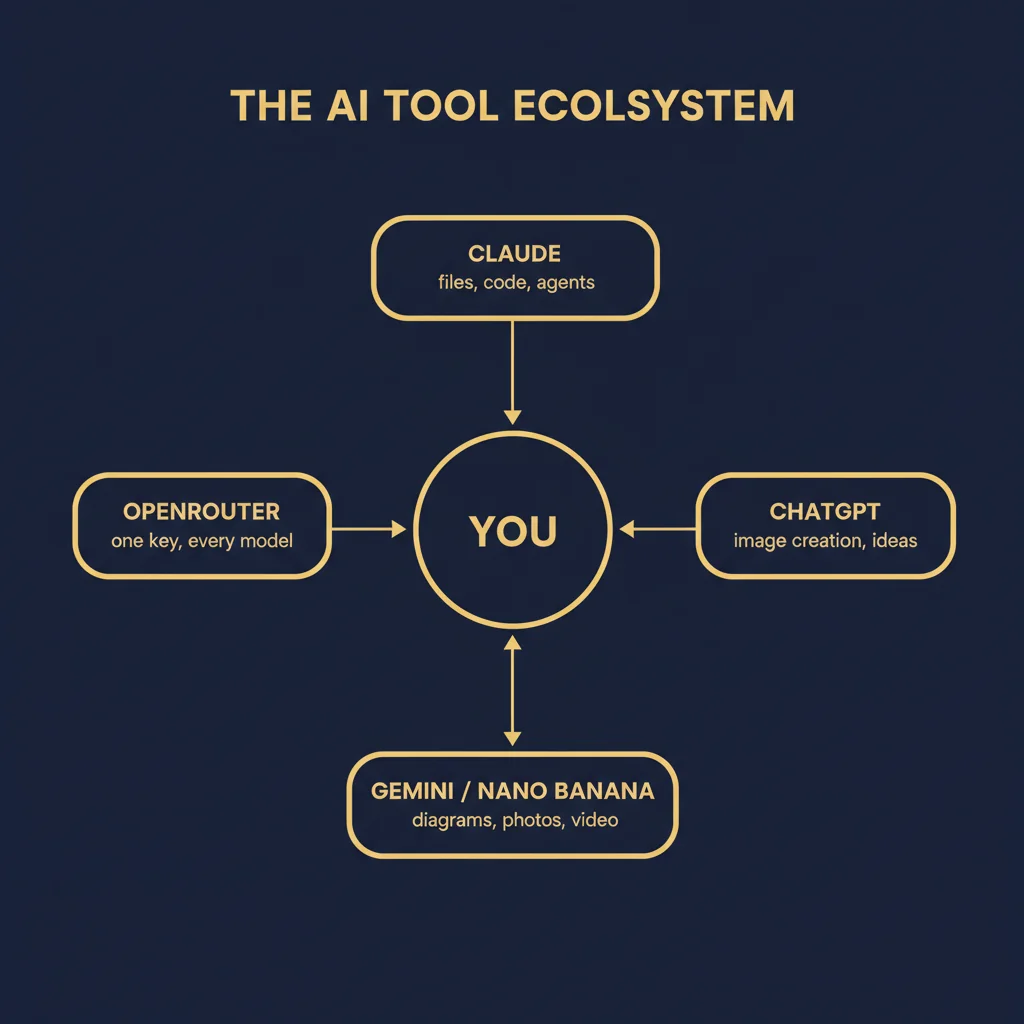
Diagram for Why this guide exists

The world has changed faster in the last two years than in the previous twenty. Tools that did not exist before 2023 now write code, draft letters, generate photographs, voice-clone your loved ones, summarise legal documents in seconds, and run autonomously while you sleep. Most people you know are using a fraction of what is now available, often the wrong fraction, often unsafely.

This guide is the connected map. It walks you through every tool worth using, in the right order, with the right warnings, ending in cyber security, operating systems, and the new robotic-ecological frontier where AI meets stewardship of the earth. The framing is the Sikh framing: act, do not merely consume; build, do not merely watch; protect what is sacred, including your data, your community, and the living planet.

Move through the modules in order if you are new. Skip ahead if you are not. Your progress is saved as you go.

Going deeper

To understand how digital tools work for our mission, think of a computer not as a brain, but as a very fast filing clerk who follows instructions literally. When we talk about building a digital map for our community, we are essentially creating a set of clear recipes that tell the computer exactly how to organize and display our history. For example, using an Artificial Intelligence tool like ChatGPT is similar to having a conversation with a library assistant who has read every book ever written but sometimes forgets which shelf they came from. Your job is to give this assistant a specific goal, such as asking it to summarize a long historical text into three simple bullet points for a social media post. By understanding that these tools are just helpers waiting for clear directions, you can stop feeling overwhelmed by the technology and start using it as a digital pen.

What this makes possible

Within an hour you will know more than most users learn in a year, because the dots will be connected. You will not just know what each tool is, you will know how each one fits the others.

Connection to nature, science & math

Technology acts as a modern cartography system similar to how early explorers used the stars to navigate the globe. Just as a compass translates magnetic fields into a readable direction, these tools translate complex data into actionable service. This guide provides the coordinates for navigating the digital landscape with precision.

First steps to try today

  1. 1. Open a free account on a tool like Claude or ChatGPT using your existing email address.
  2. 2. Type a specific request to summarize one paragraph of a Gurbani translation into language a five year old would understand.
  3. 3. Create a dedicated folder on your computer desktop named 'Sikhi Projects' to keep all your digital practice files in one place.
  4. 4. Write down one repetitive task you do every week, such as formatting an email newsletter, to tackle in the next lesson.

Common mistakes to avoid

  • Assuming the computer understands your unspoken intentions or context without you typing it out.
  • Trying to learn complex coding languages before simply mastering how to give clear instructions to existing tools.
  • Copying and pasting results from digital assistants without checking if the facts match our traditional sources.
  • Waiting until you feel like an expert before trying to use a new tool for a small task.

progress saves automatically
๐ŸŸฆ

Claude Desktop

An AI on your computer that can read your files, edit them, and finish real work.

Diagram for Claude Desktop

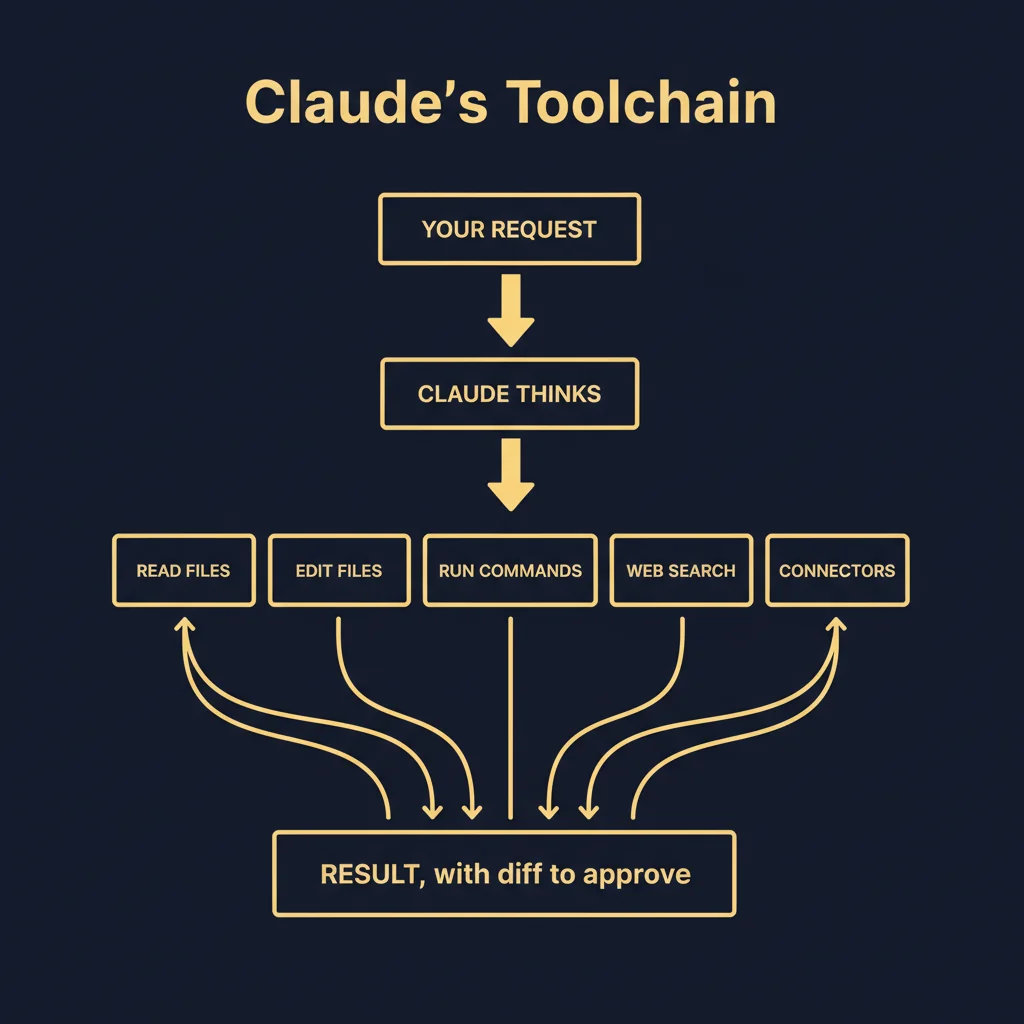
Claude Desktop is a free download from claude.ai for macOS and Windows (Linux uses the command-line version). After signing in, you have an app with three tabs. Chat is general conversation, like the website. Cowork is a background worker that runs in the cloud and continues even when the app is closed. Code is the workspace where Claude reads and edits files on your computer in real time.

Inside the Code tab, you point Claude at any folder on your computer. Then you describe what you want in plain English. Claude reads, plans, and starts working, asking permission the first time it tries each new kind of action. Every file change is shown in a side-by-side diff with Accept and Reject buttons. Nothing is saved until you approve it.

Three controls matter most. Permission mode (Ask, Auto-accept, Plan) sets how often Claude asks. The model dropdown picks the brain (Sonnet for most tasks, Opus for the hardest, Haiku for fast and cheap). Slash commands (type /) give you shortcuts to skills, plugins, and your saved workflows.

Going deeper

Think of Claude Desktop as a highly skilled personal assistant who sits at your physical desk rather than just talking to you over the phone. While a standard website chat feels like sending a letter to someone far away, this desktop version lives on your computer and can see the folders and documents you choose to share with it. For a sevadar, this means you do not have to copy and paste text back and forth between windows. You can simply point the AI toward a folder of Punjabi transcriptions or a spreadsheet of community events, and it can organize that data or fix spelling errors directly within those files. It works like a digital craftsman who has access to your workshop tools, allowing it to perform multi-step tasks like summarizing ten different PDF documents into one single report without you doing the manual labor.

What this makes possible

Anything you can describe in a sentence becomes a task. Organising photos by year, summarising every PDF in a folder, rewriting a CV in a modern style, building a small website from a notes file, drafting a letter from scratch. The desktop app turns any folder into a workspace where an intelligent assistant acts while you stay in charge.

Connection to nature, science & math

A local AI assistant functions like a personal laboratory where all instruments are within arm's reach. Much like a scientist uses a microscope to observe and manipulate a specimen directly, this software interacts with your local files to perform tasks in real time. It eliminates the distance between the observer and the data.

First steps to try today

  1. 1. Download and install the Claude Desktop application from the official Anthropic website.
  2. 2. Open a folder on your computer containing a long document you need to summarize, such as a meeting transcript or a historical text.
  3. 3. Drag that file directly from your folder into the Claude Desktop window and type a request like 'Please summarize the three main points of this document.'
  4. 4. Click the paperclip icon to attach a second file and ask the AI to compare the differences between the two documents.

Common mistakes to avoid

  • Assuming the AI can see your screen or files automatically without you explicitly dragging them into the app or giving permission.
  • Closing the application window while it is in the middle of a long task, which cancels the work it was doing.
  • Treating it like a search engine by asking for live news instead of using it to process the specific documents already on your hard drive.

Try saying / try writing

  • โ€บ"Read every PDF in this folder and write a one-page summary."
  • โ€บ"Look at my CV and rewrite it to fit a single page in a more modern style."
  • โ€บ"Make folders by year and move every image into the right one."
  • โ€บ"Build me a simple webpage from this notes file showing my favourite books."

progress saves automatically

๐ŸŸข

ChatGPT for image creation

The fastest way to turn an idea into a finished picture.

ChatGPT (chatgpt.com) became the household name for AI conversation, but its image-generation capability is what makes it indispensable for non-coders. From the same chat box, you can ask for a logo, a poster, a children's book illustration, a wedding invitation, a t-shirt design, or any image you can describe. It iterates with you on style, layout, colour, and composition.

The trick to good image generation is the prompt. The shorter and vaguer the prompt, the more random the result. The longer and more specific, the more controllable. Mention the medium (oil painting, photograph, line drawing), the style (minimalist, baroque, ghibli), the colour palette, the subject's pose, the lighting, and the aspect ratio. Save prompts that work; reuse them.

ChatGPT Plus is the subscription tier that gives access to the latest image model and uncapped use. The free tier works but throttles after a few generations.

Going deeper

Think of ChatGPT as a master artist who has seen every painting and photograph ever made but needs you to be the creative director. Instead of using a paintbrush, you use a prompt, which is simply a written description of what you want to see. When you send this description, the computer does not search the internet for an existing photo; it actually builds a brand new image from scratch by predicting where every tiny dot of color should go based on your words. It is similar to describing a scene to a friend over the phone so clearly that they can draw it exactly as you imagine. This tool allows you to create custom illustrations for your projects without needing to learn how to draw or use complex design software.

What this makes possible

Visual ideas become finished images in minutes. You stop waiting on a designer for every small graphic. Birthday cards, social posts, business mockups, story illustrations, devotional art for the gurdwara, all become one paragraph and a click.

Connection to nature, science & math

Generative imagery follows the same principles as light refraction through a prism where a single beam of input scatters into a full spectrum of color. By providing a text prompt, you are setting the angle of the light to produce a specific visual result. The AI calculates the geometry of pixels to manifest the vision you describe.

First steps to try today

  1. 1. Open ChatGPT and type a sentence starting with 'Create an image of...' followed by a specific scene.
  2. 2. Add details about the style, such as 'in the style of an oil painting' or 'like a realistic photograph'.
  3. 3. Ask the tool to change one specific thing about the image it just made, such as 'make the sky purple'.
  4. 4. Download your favorite result to your computer to use in your next presentation or document.

Common mistakes to avoid

  • Writing descriptions that are too short, such as just one or two words.
  • Asking the tool to edit a specific part of an image without being clear about what to keep and what to change.
  • Expecting the tool to spell long sentences of text inside the image perfectly every time.
  • Using vague words like 'good' or 'nice' instead of descriptive words like 'sunny' or 'wooden'.

Try saying / try writing

  • โ€บ"A devotional illustration of Guru Nanak Dev Ji in conversation with Bhai Mardana under a banyan tree, soft watercolour, warm afternoon light, 4:5 aspect."
  • โ€บ"A minimalist line-drawing logo for a small Sikh archive website, gold on navy, very clean."
  • โ€บ"A photorealistic portrait of an elderly Punjabi woman drinking chai, window light, shallow depth of field."

progress saves automatically

๐ŸŒ

Gemini & Nano Banana

Google's AI for diagrams, photos, and high-fidelity image work.

Gemini is Google's AI, available at gemini.google.com. It is competitive with Claude and ChatGPT for general conversation and excels at multi-modal work: feed it a photograph, a video, a long PDF, or even hours of audio, and it can analyse, summarise, transcribe, and reason about the content.

Nano Banana is the friendly nickname for Google's image model (officially Gemini 2.5 Flash Image and the newer Nano Banana Pro). It is particularly strong at clean diagrams, photo edits (change one element while keeping the rest), and faithful rendering of text inside images. The diagrams in this very guide were generated by Nano Banana from one-paragraph descriptions.

You can use it inside the Gemini app, or via API if you want to automate. The API is what lets developers and tinkerers generate hundreds of images programmatically, for example a deck of cards for a children's storybook or a series of branded social posts.

Going deeper

Gemini and Nano Banana are tools that act like a digital artist and architect working inside your computer. While standard AI often focuses on writing text, these specific models are built to understand and create visual information like diagrams and high-quality photos. Think of it like a master craftsman who can look at a rough sketch on a napkin and instantly build a detailed 3D blueprint or a realistic photograph. For a sevadar, this means you do not need to learn complex graphic design software to create professional posters or flowcharts for your projects. You simply describe what you want in plain language, and the AI translates those words into visual pixels, much like how a translator turns one language into another.

What this makes possible

Three things ChatGPT struggles with become easy: clean technical diagrams, photo editing where you keep most of the photo, and rendering text inside images correctly. For the Sikh archive specifically, Nano Banana makes restoration mockups, fresco previews, and infographic-style explainers fast.

Connection to nature, science & math

Multimodal AI mirrors the way the human nervous system processes different sensory inputs simultaneously. Just as the brain combines sight and touch to understand an object, these models process images and text together to solve problems. This integration allows for more accurate adjustments and diagramming based on visual evidence.

First steps to try today

  1. 1. Open the Gemini interface and type a request to create a simple diagram of a local community project.
  2. 2. Upload a blurry or poorly lit photo from a recent event and ask the AI to describe how to improve its quality.
  3. 3. Ask the tool to generate three different visual layouts for a flyer announcing a weekly Diwan.
  4. 4. Practice 'prompting' by describing a specific scene from history and seeing how accurately the AI can visualize the details.

Common mistakes to avoid

  • Giving vague instructions like 'make it look good' instead of describing specific colors and layout.
  • Assuming the AI knows the exact spelling of names or Gurmukhi words without double-checking the final image.
  • Trying to use the tool for long essays when its primary strength is visual and diagram-based work.
  • Expecting the AI to remember your previous design preferences without explicitly stating them in the new request.

progress saves automatically

๐Ÿงญ

OpenRouter

One API key, every AI model. Pay-as-you-go.

OpenRouter is a single doorway to almost every AI model on the market: Claude, GPT, Gemini, Qwen, Mistral, Llama, and dozens of open-source variants. You sign up once, get one API key, top up credits, and call any model from any vendor with the same code. No need to keep separate accounts and separate billing for each company.

For non-developers, OpenRouter is mostly invisible. For tinkerers, hobby builders, and sevadars who want to automate something, it is the cleanest place to start because you can compare models on the same task in the same hour. For example, you can write a small script that asks five different models to translate a passage, then pick the best one.

Pricing is per token, per model. The cheapest models cost a few cents per million tokens; the most expensive a few dollars. You only pay for what you use, no monthly subscription required.

Going deeper

Think of OpenRouter as a universal adapter for artificial intelligence. Normally, if you want to use different AI programs like ChatGPT or Claude, you have to create separate accounts and pay monthly subscriptions for each one. OpenRouter acts like a single switchboard that connects you to all of these different brains through one single account. Instead of paying a flat monthly fee, you put a small amount of money into a digital wallet and only pay for the exact number of words the AI generates for you. It is similar to using a prepaid calling card that works on every phone network in the world rather than signing up for five different phone contracts.

What this makes possible

If you build anything yourself with AI, OpenRouter saves you from vendor lock-in. The 14 apologetics theses on this very site were generated and audited via OpenRouter, switching between Gemini Pro, Gemini Flash, and Qwen 3.5 in the same pipeline.

Connection to nature, science & math

A single API key for multiple models works like a universal power adapter that fits every electrical socket in the world. It standardizes the flow of information so that different systems can receive the same energy without changing the hardware. This efficiency ensures that you only pay for the specific amount of current you consume.

First steps to try today

  1. 1. Visit the OpenRouter website and create an account using your existing email.
  2. 2. Go to the Credits section and deposit five dollars to activate your pay-as-you-go balance.
  3. 3. Navigate to the Keys section to create your first secret code which allows other apps to talk to the AI.
  4. 4. Open the Chat section on the site to test three different models like GPT-4o and Claude 3.5 Sonnet using your single balance.

Common mistakes to avoid

  • Depositing too much money at once instead of starting with the five dollar minimum
  • Leaving an API key visible in a public document where others can find and use your credits
  • Forgetting to set a credit limit which can lead to unexpected spending if a program runs too long
  • Assuming all models cost the same amount when some are much cheaper or more expensive than others
curl https://openrouter.ai/api/v1/chat/completions \
  -H "Authorization: Bearer $OPENROUTER_KEY" \
  -H "Content-Type: application/json" \
  -d '{
    "model": "anthropic/claude-sonnet-4",
    "messages": [{"role":"user","content":"Hello"}]
  }'

progress saves automatically

๐Ÿง 

Choosing an AI model in 2026

Claude vs GPT vs Gemini vs open source. What to use when.

Diagram for Choosing an AI model in 2026

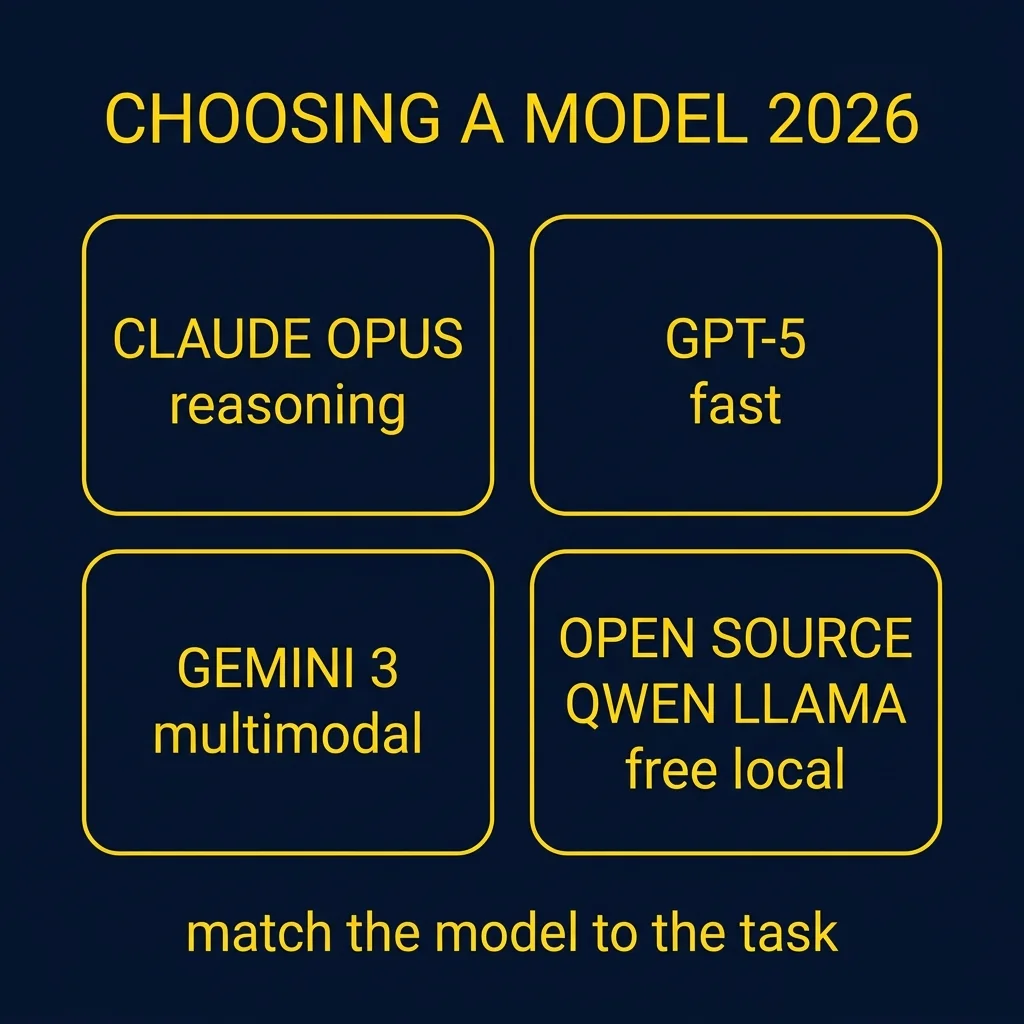
Choosing an AI model in 2026 is about matching your specific task to the right tool. The landscape is dominated by four major families: OpenAI ChatGPT, Anthropic Claude, Google Gemini, and XAI Grok. ChatGPT remains the best all-around choice for general brainstorming and features the most advanced memory, allowing it to remember your preferences across different projects. Claude is widely considered the superior choice for high-quality writing and complex coding, as its responses feel more human and less robotic. Gemini excels in the Google ecosystem and is the leader in analyzing long videos or audio files. Grok is the fastest for real-time news because it pulls data directly from social media.

Beyond these big names, open-source models like Llama, Qwen, and DeepSeek have become powerful alternatives. These models are free to use and can run directly on your own computer, which means your data stays private and you do not have to pay a monthly subscription. While they used to be less capable than paid versions, the gap has closed significantly. For basic daily tasks, an open-source model is often just as good as a paid one. However, for high-stakes business work or complex reasoning, the paid frontier models like Claude Opus 4.7 or GPT 5.5 still hold a slight edge in accuracy and self-verification.

The newest frontier in 2026 is AI agents. Unlike standard chatbots that just talk, agents like Claude Code or OpenClaw can actually perform work on your computer. They can browse the web, edit files, and manage your calendar while you sleep. For sevadars, this might look like an assistant that automatically summarizes long meetings or organizes community documents. While these tools are more advanced, they represent the shift from AI as a search engine to AI as a digital worker. Understanding the cost-versus-capability trade-off is key, as paid plans usually cost around 20 dollars per month but offer significantly better reasoning than free versions.

Going deeper

The concept of a context window is vital. This is the amount of information the AI can remember at one time. In 2026, models like Gemini and Grok have windows of up to 2 million tokens, which is equivalent to thousands of pages of text or hours of video. This allows you to upload entire books or long historical records and ask the AI specific questions about the content without it forgetting the beginning of the file.

What this makes possible

This module enables sevadars to select the most cost-effective and capable AI tools for community service tasks like writing articles, managing projects, and organizing data without needing technical expertise.

Connection to nature, science & math

Choosing an AI model is similar to selecting a specialized tool in a workshop. Just as a carpenter uses different saws for different cuts, AI models use specific mathematical architectures to prioritize either speed, creative writing, or logical reasoning.

First steps to try today

  1. Identify your primary task, such as writing, coding, or data analysis.
  2. Try the free versions of Claude and ChatGPT to see which interface feels more intuitive.
  3. If you need real-time information or news, use Grok on the X platform.
  4. Explore open-source options like DeepSeek if you want to experiment without a subscription fee.

Common mistakes to avoid

  • Using ChatGPT for high-quality creative writing when Claude would provide a more natural tone.
  • Paying for four separate subscriptions instead of using an all-access aggregator tool to save money.
  • Assuming free models have the same reasoning capabilities as the latest paid frontier models.
  • Uploading sensitive or private community data to closed-source models without checking privacy settings.

Try saying / try writing

  • โ€บ"Use Claude Opus 4.7 for drafting a thoughtful blog post or a script for a community event."
  • โ€บ"Use ChatGPT 5.5 for brainstorming a new project plan and creating a logo with text."
  • โ€บ"Use Gemini 3.1 Pro to summarize a two-hour video recording of a meeting."
  • โ€บ"Use Grok 4.3 to generate a spreadsheet or a PowerPoint deck based on current trending topics."

progress saves automatically

๐Ÿค–

Codex (OpenAI's agentic super-app)

Beyond a chatbot. Local files, browser automation, scheduled tasks, reusable skills.

Diagram for Codex (OpenAI's agentic super-app)

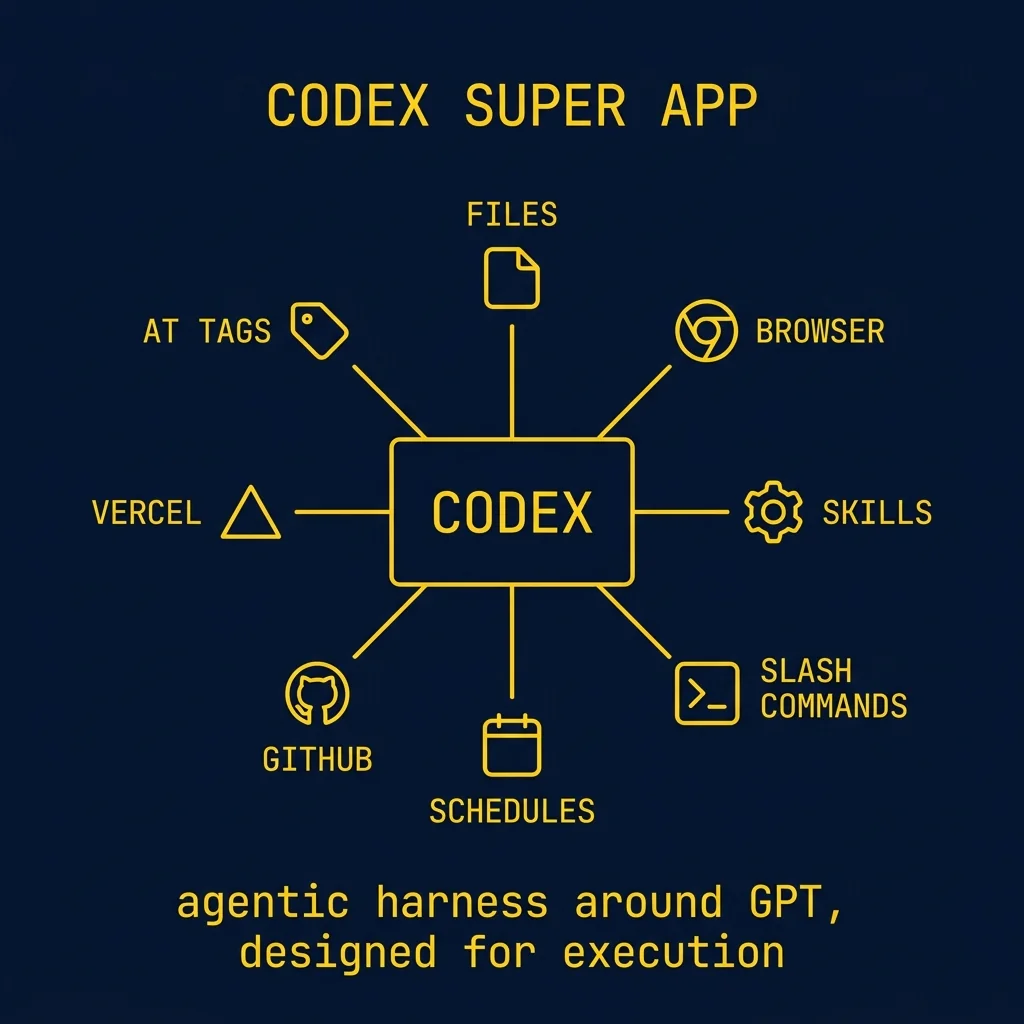
Codex is a powerful agentic super app that goes beyond simple chatting by working directly with your local files and computer. Unlike standard web chatbots, Codex operates within specific project folders on your desktop, allowing it to create Excel sheets, automate your browser, and even use your mouse and keyboard. It is designed to be a pragmatic execution tool that follows complex plans and troubleshoots technical issues effectively.

The interface is organized into projects and chats, featuring a toggle to adjust intelligence levels from Low to Extra High. You can switch between Plan Mode for brainstorming, Auto Review for safety, and Full Access for autonomous execution. To keep the AI organized, you use an agents.mmd file as an onboarding document and store sensitive credentials in an env.local file to ensure they stay private during deployments.

One of the most unique features of Codex is the ability to build reusable skills stored in a global file called thecodex. These skills act like recipes that you can trigger using slash commands like /browser_use or /image_gen. By combining these skills with scheduled automations, you can have Codex perform tasks like pulling YouTube data and updating a live website while you sleep.

Going deeper

For those with zero coding experience, think of Codex as a digital manager that has access to your entire office. When you start a project, you are essentially giving the AI a specific desk (a folder on your computer) to work from. By using Plan Mode, you can talk through your ideas before the AI touches anything, ensuring you are both on the same page. You can watch the AI work in real-time through its built-in browser or follow its progress via a small 'pet' icon on your screen. This transparency makes it easy to steer the AI if it starts heading in the wrong direction.

What this makes possible

This tool enables sevadars to build fully functional data dashboards and websites without writing a single line of code. You can automate the collection of community feedback, analyze patterns in spreadsheets, and deploy live web apps to services like Vercel. It allows for the creation of 24/7 digital assistants that manage local files and perform browser-based research tasks autonomously.

Connection to nature, science & math

The relationship between Codex and its skills is similar to the concept of muscle memory in biology. Just as a repetitive physical action eventually becomes an unconscious reflex stored in the nervous system, a skill in Codex is a refined set of instructions stored in thecodex file. Once a complex task is practiced and saved, the system no longer needs to 'think' through the steps from scratch, allowing it to execute the entire sequence instantly upon command.

First steps to try today

  1. 1. Download the Codex app and sign in with a ChatGPT Plus account ($20 per month).
  2. 2. Create a new project folder on your desktop and use the /personality command to set the AI to pragmatic mode.
  3. 3. Create an agents.mmd file by asking Codex to summarize your project goals and background context.
  4. 4. Build your first skill by performing a task once and then asking Codex to save that workflow into thecodex.

Common mistakes to avoid

  • Leaving the intelligence on Extra High for simple tasks, which can over-engineer solutions and waste session limits.
  • Forgetting to close local files like Excel sheets before asking Codex to update them, which causes the automation to stall.
  • Putting API keys or passwords in random files instead of the env.local file, risking public exposure.
  • Closing the Codex app or turning off the computer while a local scheduled automation is supposed to be running.

Try saying / try writing

  • โ€บ"Using /browser_use to navigate a website, click buttons, and take screenshots to find visual bugs."
  • โ€บ"Setting a weekly automation to pull YouTube comments into an Excel file and analyze them for content ideas."
  • โ€บ"Generating a custom logo and UI elements using the /image_gen skill for a new community dashboard."

progress saves automatically

๐Ÿ”Œ

Connectors and MCP

How AI talks to your other tools, securely.

Diagram for Connectors and MCP

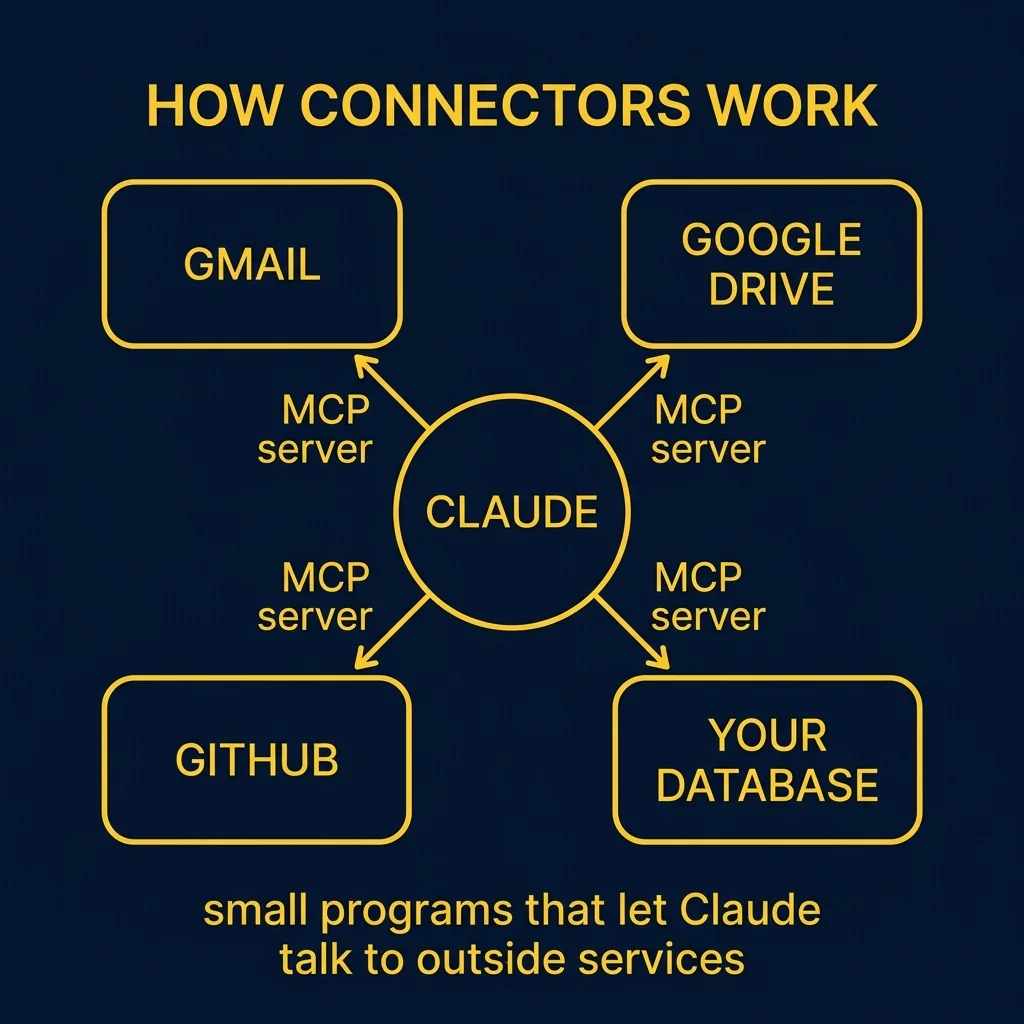
Model Context Protocol (MCP) is the open standard that lets an AI safely talk to outside services like Gmail, Google Drive, Slack, GitHub, Linear, your bank, your music library, your home server. Each connector is a small program that translates between the AI and one outside service. You install or enable a connector once; from that point on, the AI can use that service inside any conversation.

Inside Claude Desktop, connectors are point-and-click. Click the plus button next to the prompt box, choose Connectors, and pick from a list of supported services. Authorise it the same way you authorise any other app, and it is now part of your toolbox.

For developers and tinkerers, MCP is also a standard you can implement. Hundreds of community-built MCP servers exist for everything from controlling your home lights to querying SQL databases. The protocol is open, so what you can build is bounded only by what you can describe.

Going deeper

Think of a Connector like a digital translator that allows two different pieces of software to work together as a single team. While an Artificial Intelligence model is very smart, it is usually locked in a room without access to your personal files or your calendar unless you provide a bridge. The Model Context Protocol, or MCP, is a universal standard that acts like a common plug, similar to how a USB port allows any brand of mouse to work with any brand of computer. By using these connectors, you can give the AI permission to read a specific folder on your computer or look at your emails to help you draft responses. This means the AI is no longer just guessing based on general knowledge, but is instead acting as a personal assistant with direct access to the specific information you choose to share.

What this makes possible

Your scattered apps become one workspace. Instead of switching between five tabs to compose a project update, you ask the AI to gather the latest from your project tracker, pull the relevant Slack thread, find the meeting notes in Drive, and draft a one-paragraph summary. The plumbing between apps is something the AI now handles.

Connection to nature, science & math

Connectors act as the synapses in a biological network that allow different organs to communicate. By linking AI to external tools like email or databases, you are creating a nervous system where information flows freely between specialized parts. This connectivity ensures the entire organism responds to a single stimulus effectively.

First steps to try today

  1. 1. Open your preferred AI chat interface and look for a section labeled 'Plugins', 'Extensions', or 'Tools' in the settings menu.
  2. 2. Select one simple service you use daily, such as Google Calendar or a local folder of text notes, to practice your first connection.
  3. 3. Ask the AI a specific question that requires it to look at that data, such as 'What is my first meeting tomorrow?' to verify the bridge is working.
  4. 4. Locate the 'Disconnect' or 'Revoke Access' button so you know exactly how to stop the AI from reading your data when the job is done.

Common mistakes to avoid

  • Assuming the AI can automatically see all your files without you manually setting up a connector first.
  • Leaving a connector active for a sensitive folder after you have finished the specific task you needed help with.
  • Trying to use a connector that was built for a different AI program, such as using a ChatGPT tool inside of Claude without checking compatibility.
  • Forgetting to refresh the connection when you change your password on the service you are trying to link.

progress saves automatically

Next up